
How to calculate driver pay and prepare a settlement.
Start with the agreed pay method, check the eligible loads and pay basis, then review additions, deductions and the driver’s settlement PDF.
Driver pay starts with the agreed method: eligible miles multiplied by the per-mile rate, eligible revenue multiplied by the pay percentage, or the configured fixed amount. Additions and deductions then determine net pay. Both Carrier Hub NEXT and CH Dispatch support per-mile, percentage and flat-rate driver pay, with driver settlement PDFs. Choose NEXT for your own fleet or CH Dispatch for a carrier-client dispatch business.
Per-mile, percentage and flat-rate driver pay.
| Method | Starting calculation | Check before generating pay |
|---|---|---|
| Per mile | Eligible pay miles × agreed rate per mile | Loaded miles or total miles, the recorded mileage and rate. |
| Percentage | Eligible revenue base × agreed percentage ÷ 100 | Which revenue and enabled extras belong in the pay base. |
| Flat rate | The fixed amount for the configured period or eligible load | A period amount is counted once; a per-load amount follows the configured load rule. |
These are different pay arrangements. A carrier’s invoiced freight total, a dispatcher’s service fee and a driver’s pay base are not interchangeable.
How to calculate driver pay per mile.
Multiply the eligible pay miles by the agreed driver pay rate. If the rate is quoted in cents per mile, convert it to the same currency unit used in the statement before multiplying. First establish whether the arrangement pays loaded miles or total miles. In NEXT, the per-mile basis can be loaded miles or loaded plus recorded deadhead miles.
A driver’s rate per mile is a compensation rate. The carrier’s cost per mile (CPM) is a wider operating-cost metric. Revenue per mile (RPM) measures revenue against mileage. They answer different questions even though all use a per-mile unit.
How to calculate percentage driver pay.
Multiply the eligible revenue base by the saved percentage. Check the actual pay base rather than applying the rate automatically to every amount on a freight invoice.
In NEXT, percentage terms can distinguish linehaul from the broader configured revenue basis. Detention and layover are included when enabled. Lumper is not automatically added to the driver’s percentage base. Review the saved terms and load breakdown before generating the statement.
How flat-rate driver pay differs.
A flat rate is a fixed amount under the configured arrangement. Confirm whether it is for the selected period or for each eligible load; those produce different results.
NEXT’s one-time settlement terms support a flat amount for the period. Effective saved profiles also support flat-per-load arrangements. A period amount is applied once rather than repeated on every load. Review the account’s available method and effective settings before preparing pay.
From load earnings to net driver pay.
Check approved additions and deductions, including any fuel advance recorded as a deduction in the relevant workflow. Count each item once. In NEXT, TONU compensation follows its separate configured pay rule and should not be inferred from the standard per-mile or percentage rate.
A generated statement explains pay. Creating or emailing a settlement PDF does not itself transfer money.
Calculate, review and create the driver settlement.
- Select the driver and period. Review the eligible loads and pickup-date range for the workflow.
- Confirm the agreed pay method. Check the rate, mileage or revenue basis and effective settings.
- Review each load. Check earnings and any separately configured extras or TONU compensation.
- Check additions, deductions and net pay. Review all adjustment lines before generating the document.
- Generate and inspect the PDF. Confirm the payee, period, load lines and totals before sharing it.
Continue to the driver pay statement and settlement PDF guide for the document workflow and complete examples.
Which platform fits the driver-pay workflow?
Carrier Hub NEXT is for a carrier running its own trucking company. Driver pay connects with loads, settlements, expenses, invoices and reporting.
CH Dispatch is for independent dispatchers and dispatch companies managing carriers as clients. Its driver settlement workflow sits alongside carrier-client loads, dispatch invoices and dispatcher pay. The CH Dispatch examples include a per-mile driver settlement.
For the dispatcher’s own earnings, use the separate dispatcher-pay calculation guide.
Inspect a driver settlement example.
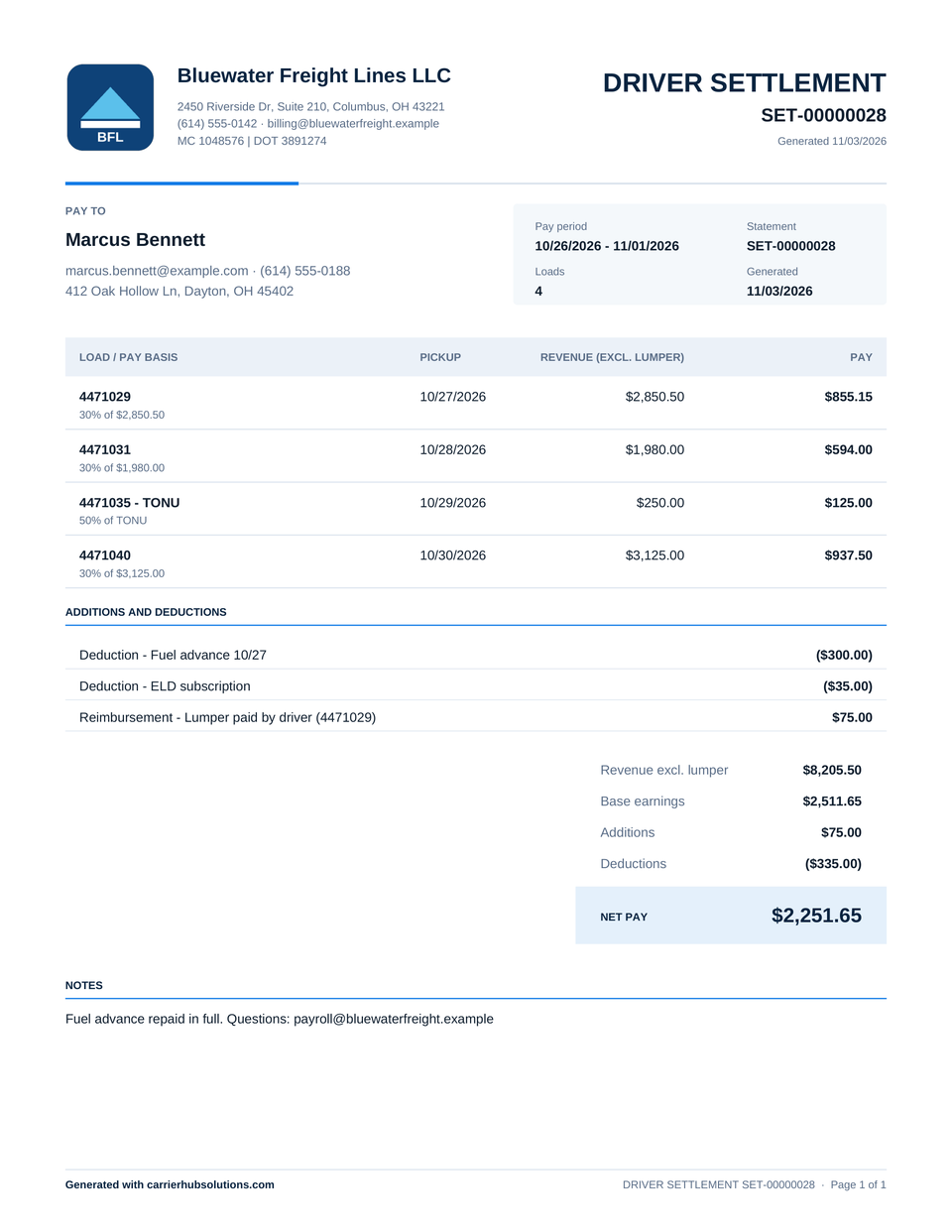
Open the complete NEXT percentage-pay PDF. Compare it with per-mile and CH Dispatch settlement examples.
Check the examples behind the workflow.
- Open complete demo PDFs and image previews. The examples use fictional sample data and the platforms’ document templates.
- Watch the CH Dispatch how-to videos, including invoices and driver settlements.
- Read TriDex’s CH Dispatch story or Mr. Transporter’s NEXT story for customer perspectives.
- Meet the dispatcher-led team behind Carrier Hub Solutions.
Questions about driver pay.
How do I calculate driver pay per mile?
Multiply the eligible pay miles by the agreed driver rate per mile. Check whether the terms use loaded miles or total miles, review each load’s mileage, then apply the workflow’s additions and deductions before creating the settlement.
Can I calculate driver pay as a percentage?
Yes. Both platforms support percentage driver pay. Review the eligible revenue basis and saved percentage. In NEXT, detention and layover depend on the applicable settings, and lumper is not automatically added to the driver percentage basis.
Can driver pay be a flat rate instead of per mile?
Yes. Both platforms support flat-rate driver pay. Confirm the scope of the fixed amount in your account. NEXT supports one-time flat-per-period terms, and effective saved profiles also support flat-per-load arrangements. A period amount and a per-load amount should not be treated as the same calculation.
Is the driver’s pay rate per mile the same as carrier CPM?
No. A driver’s rate per mile calculates that driver’s compensation. Carrier cost per mile includes the operating and compensation costs recognized in the report. Revenue per mile uses revenue rather than costs.
Can I generate a driver settlement PDF after reviewing the pay?
Both Carrier Hub NEXT and CH Dispatch support driver settlement PDFs. Review the selected driver, eligible loads, pay basis, adjustments and net pay, then inspect the saved PDF before sharing it.
Connect driver pay with the rest of your work.
Explore the platform for your carrier or dispatch business, and review the configured pay workflow.