
Dispatcher pay and carrier invoices, connected.
Use the load records you already manage to review earnings and prepare the right payment document for the right person.
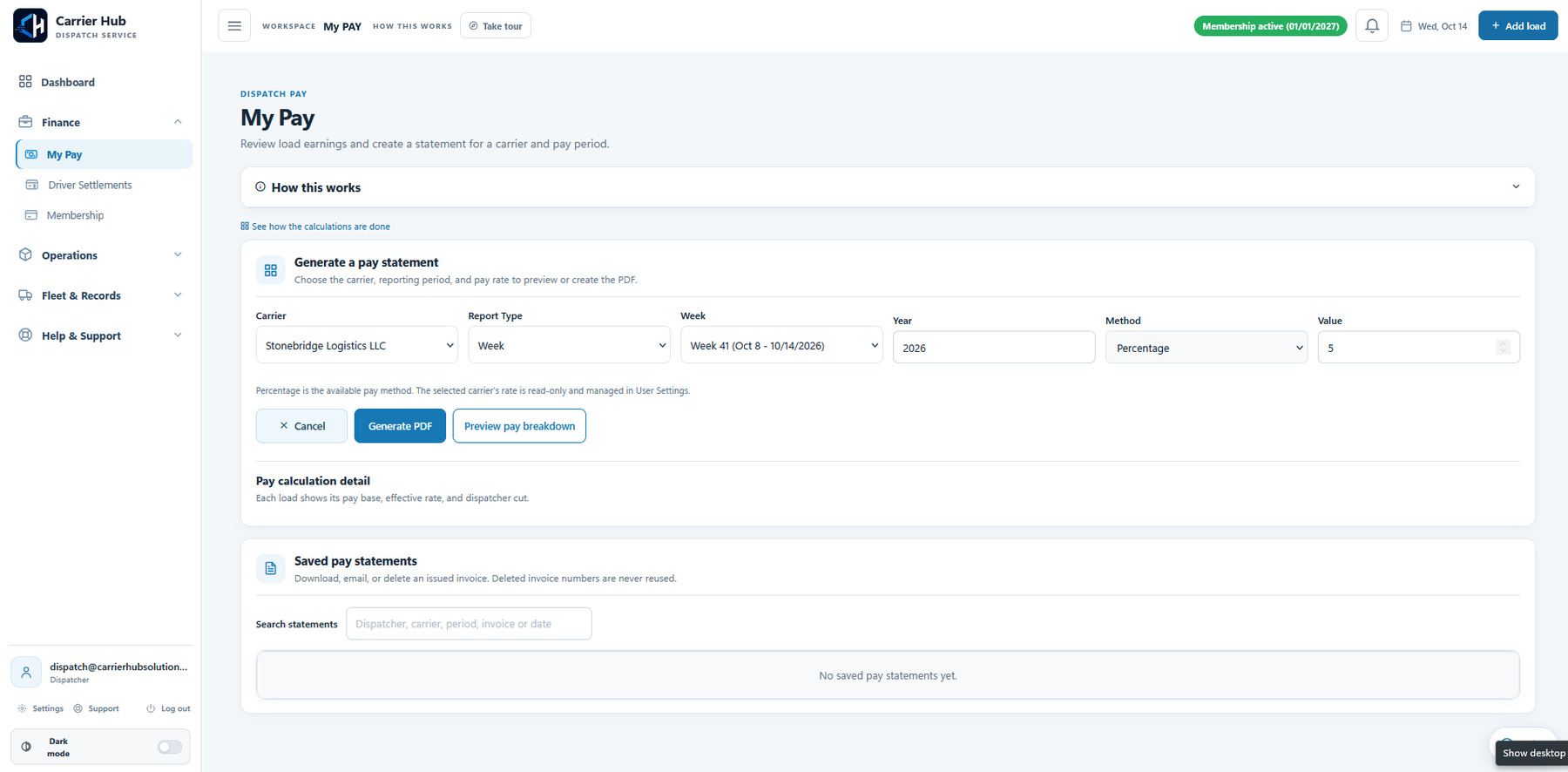
CH Dispatch connects carrier-specific dispatcher pay settings with load records. In Invoices and My Pay, select the carrier and pickup-date range, review the pay breakdown and generate the dispatcher invoice or statement. Driver settlements are a separate document workflow using the driver's pay method and adjustments.
Know which document you are preparing
| Document | What it records | What to review |
|---|---|---|
| Dispatcher invoice / statement | Dispatcher earnings due under the carrier's configured pay arrangement. | Carrier, pickup-date range, included loads, pay base and effective rate. |
| Driver settlement | The selected driver's pay for the statement period, with any additions or deductions. | Driver, pay method, included loads, adjustments and net pay. |
These documents serve different purposes. Generating either PDF records the calculation; it does not execute a payment.
For a working dispatcher's example, read Durim Qazimi's move from Excel, folders and separate PDF tools to CH Dispatch.
Review earnings before generating the carrier invoice
- Choose the carrier and pickup-date range. Make sure the selected period includes the loads you intend to bill.
- Preview the breakdown. Review each load's pay base, configured rate and dispatcher earnings.
- Check the paperwork. Keep the RateCon and relevant BOL/POD documents organized with their loads. Read the statements, invoices and email guide for the document workflow.
- Generate and review the PDF. Open the saved invoice from statement history and check the figures and period before sending it.
Your permissions and account setup control which actions are available. The plan comparison explains included features.
A dispatcher pay example
This example uses the fictional demo load amounts and a 5% dispatcher rate. It illustrates the calculation; your carrier's agreement and configured pay base determine the real result.
| Sample load | Pay base | Dispatcher rate | Earnings |
|---|---|---|---|
| Load 1 | $1,800 | 5% | $90 |
| Load 2 | $2,200 | 5% | $110 |
| Load 3 | $1,500 | 5% | $75 |
| Total | $5,500 | 5% | $275 |
CH Dispatch's saved PDF lets you review the pay period, loads and calculation together. The full demo walkthrough follows the sample load-to-invoice process.
Prepare a driver settlement separately
Select the driver and pickup-date range. Review the pay method from the driver profile, then check the loads and any additions or deductions before generating the settlement.
For an illustrative 25% driver arrangement on the same $5,500 pay base, gross pay would be $1,375. A $100 fuel advance deduction would bring net pay to $1,275. The actual settlement uses the configured driver arrangement and statement adjustments.
Review the saved settlement PDF before using the email option. A fuel advance line records a deduction in the statement; it does not move money.
Keep review, email and payment separate
Creating a PDF, sending it by email and paying the amount are different steps. CH Dispatch lets you save and review the document before using the separate email action. Confirm the intended recipient and document before sending.
For questions about a screen or action, open the in-platform Support chat. The CH Dispatch help assistant provides Help Center-based instructions, with a live-agent handoff available in the same conversation.
Go straight to the document you need.
Questions about this workflow
How is dispatcher pay calculated in CH Dispatch?
It uses the selected carrier's configured pay settings and the relevant load records. Preview the pay breakdown and check each load's pay base, effective rate and earnings before generating the document.
Which dates should I check for the pay period?
The demonstrated pay and settlement workflows use the load pickup-date range. Check that your selected range includes the loads you intend to include.
Can I add a fuel advance deduction to a driver settlement?
Yes. In the demonstrated settlement workflow, Fuel Advance can be added as a deduction. Review the adjustment and net pay before generating the statement.
Does CH Dispatch transfer the money when I generate a PDF?
No. The PDF records the invoice or settlement calculation. Generating the document, emailing it and executing a payment are separate actions.
Try the workflow for your dispatch business.
Request the trial and our team will email your login details, guide and confirmed dates.